For freelancers, tracking time and getting paid are closely connected. If you bill clients by the hour, knowing exactly how much time you spend on a project is only half the job. You also need a practical way to turn those hours into invoices, monitor expenses, and understand whether your projects are actually profitable. That’s the reason why we have created this article on best time tracking apps where you can find all of the apps’ comparison. But now, more about Harvest:
Harvest takes a slightly different approach from tools such as Toggl Track and Clockify.
Toggl Track is primarily focused on making time tracking simple, while Clockify is particularly attractive for freelancers looking for a generous free option. Harvest sits somewhere between time tracking, project management, expense tracking, and invoicing.
The idea is straightforward: track your work, connect those hours to clients and projects, turn billable time into invoices, and use the resulting data to understand how your business is performing.
In 2026, Harvest also has a redesigned interface and new features, including a calendar view for time tracking and customizable white-label invoices. Its current pricing structure has also changed, making it particularly important for freelancers to understand what they’re actually getting before signing up.
So, is Harvest still worth it for freelancers?
For professionals who regularly invoice clients based on tracked time, yes: but it’s not necessarily the best choice for everyone.
What we like
- Time tracking and invoicing work together naturally
- Easy client and project organization
- Expense tracking
- Project budgets and profitability reporting
- Calendar-based time tracking
- Accounting and payment integrations
- Professional-looking invoices
- Free plan available for individual freelancers
What could be better
- The free plan is limited to two projects
- Some advanced features are designed more for teams than solo freelancers
- It can be more than you need if you only want a basic timer
- Pricing should be considered carefully as your number of projects or team members grows
What Is Harvest?
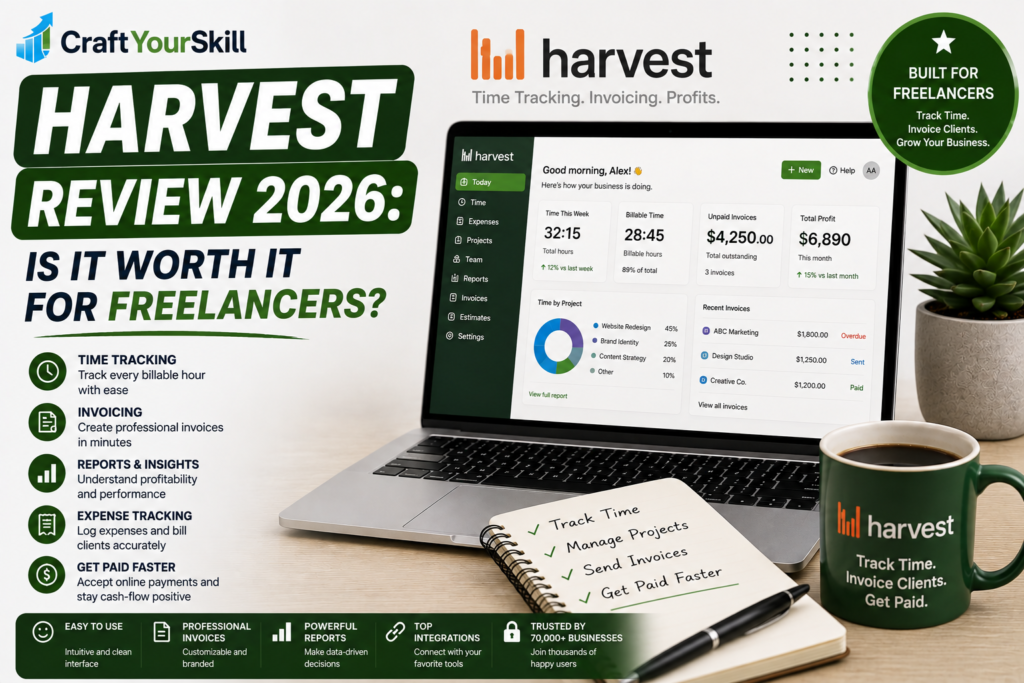
Harvest is a time tracking and invoicing platform designed for professional services businesses.
The platform allows users to track time against clients and projects, record expenses, analyze project performance, and create invoices based on billable work.
The important distinction is that Harvest isn’t simply a stopwatch.
The goal is to connect the entire process:
Work → Track time → Analyze project → Create invoice → Get paid
That’s particularly useful for freelancers who currently use one application for time tracking, another for invoices, and a spreadsheet to calculate whether projects are profitable.
Harvest brings many of those tasks together.
The company says more than 70,000 companies use Harvest, and its current product combines time tracking, reporting, billing, project organization, and team management.
Who Is Harvest Best For?
Harvest makes the most sense for freelancers who have a direct relationship between their working hours and their revenue.
For example, consider a freelance marketing consultant charging $100 per hour.
Instead of writing down hours manually and creating an invoice at the end of the month, the consultant can track time against each client’s project throughout the month.
At the end of the billing period, those hours can be used to create an invoice.
That workflow becomes particularly valuable when you’re managing several recurring clients.
On the other hand, if you charge a fixed $2,000 fee for every project regardless of the number of hours involved, you may get more value from Harvest’s project profitability and time analysis than from its invoicing functionality.
Harvest Time Tracking
Time tracking is still the foundation of Harvest.
You can track time using a traditional timer, enter hours manually, or use timesheets. Harvest also supports tracking through connected calendars, while its newer calendar view gives users a visual overview of their working week.
The basic workflow is simple.
You create a client, create a project, define the relevant tasks, and then assign your tracked time to that project.
For example:
Client: ABC Marketing
Project: SEO Campaign
Tasks:
- Keyword research
- Competitor analysis
- Content strategy
- Client meetings
- Reporting
At the end of the month, you have a much more useful record than simply knowing that you worked 38 hours.
You know exactly where those 38 hours went.
The New Calendar View
One of the notable Harvest updates in 2026 is its calendar view.
Instead of looking at time entries as a traditional list or timesheet, you can see your week visually and track time directly from your schedule.
This is useful for freelancers who already organize their work around meetings and calendar appointments.
For example, if you have:
- 9:00–10:00 — Client meeting
- 10:00–12:00 — Content strategy
- 13:00–15:00 — SEO work
- 15:00–16:00 — Reporting
you can use the calendar view to understand your working day without constantly switching between your calendar and time tracker.
It’s a relatively small feature, but it makes Harvest feel more natural for freelancers who plan their days around scheduled work.
Invoicing
This is where Harvest separates itself from simpler time tracking applications.
Once you’ve tracked billable hours, Harvest can use that information when creating invoices.
Instead of manually calculating:
17.5 hours × $80 = $1,400
you can work from your tracked billable time.
That reduces one of the most annoying administrative tasks for hourly freelancers.
Harvest also supports expense tracking, meaning reimbursable expenses can be associated with client work rather than maintained separately in a spreadsheet.
For freelancers who send several invoices every month, this can save considerably more time than the timer itself.
2026 White-Label Invoices
Harvest introduced another useful feature in its 2026 redesign: white-label invoices.
This allows users to remove Harvest branding and customize invoices with their own branding, including colors, banners, and contact details.
That’s particularly relevant for freelancers who want their client-facing documents to look professional.
An invoice isn’t just an accounting document. It’s also part of your brand experience.
If you’re working as an independent consultant or running a small agency, having your own branding on invoices makes the business feel considerably more established.
Project Budgets and Profitability
Another reason to consider Harvest is that it doesn’t stop at tracking hours.
You can use the data to understand whether projects are staying within budget and how much time you’re actually spending on client work.
This is especially useful for fixed-price projects.
Imagine you agree to build a website for $3,000.
You estimate that it will require 30 hours, meaning your expected effective rate is:
$3,000 ÷ 30 hours = $100/hour
But after tracking your work, you discover that the project actually required 50 hours.
Your effective hourly rate was therefore:
$3,000 ÷ 50 hours = $60/hour
Without time tracking, you might simply complete the project and move on.
With Harvest, you can identify the problem and adjust your pricing or scope for the next project.
That’s one of the more valuable uses of time tracking for freelancers because it turns your historical data into pricing information.
Reporting
Harvest provides reporting around time, projects, clients, expenses, and profitability.
For a freelancer, the most useful questions are usually:
- How many hours did I spend on this client?
- How much of that time was billable?
- Which projects are taking longer than expected?
- How much revenue is each client generating?
- Am I spending too much time on non-billable work?
These reports become more valuable as your freelance business grows.
If you’re working with only one client and one project, you probably don’t need sophisticated reporting.
If you’re managing ten clients across several projects, however, having this information available in one place can make a significant difference.
Integrations
Harvest integrates with a range of business and productivity tools.
The platform currently supports integrations with accounting and payment services such as Stripe, QuickBooks Online, Xero, and Deel, among others.
It also connects with productivity and project management tools, allowing freelancers and teams to incorporate time tracking into an existing workflow rather than managing everything inside Harvest.
This matters because the best time tracker isn’t necessarily the one with the most features.
It’s the one you’ll actually use consistently.
Harvest Pricing in 2026
Harvest’s current pricing structure is worth paying close attention to.
There is a Free plan, which is designed for individual freelancers and includes:
- 1 seat
- 2 projects
- Time tracking
- Invoicing
- Expense tracking
- Mac and iOS apps
Harvest currently lists its Teams plan at $9 per seat per month when billed annually, or $11 per seat per month when billed monthly. The Teams plan adds unlimited seats along with additional team reporting, invoicing, accounting integrations, and other features.
This creates a fairly clear dividing line.
If you’re a freelancer with only one or two active projects, the free plan may be enough.
If you’re constantly creating new projects for different clients, the two-project limitation can become restrictive, meaning you’ll likely need to upgrade.
That is something to consider before choosing Harvest purely because it has a free plan.
Is Harvest’s Free Plan Good Enough for Freelancers?
For some freelancers, absolutely.
Suppose you’re a freelance consultant with two long-term clients. You could create one project for each client and use Harvest’s free plan to track your time and invoice them.
You wouldn’t necessarily need to pay anything.
However, if you work on many short-term projects, the limitation becomes more noticeable.
A freelance designer might have five website projects, three logo projects, and several smaller jobs running throughout a month. In that situation, two projects won’t be enough.
So the free plan is best viewed as a genuine starting point rather than an unlimited free version.
Harvest vs. Toggl Track
Toggl Track and Harvest solve related but slightly different problems.
Toggl Track is particularly strong when your primary goal is simple, flexible time tracking.
Harvest becomes more attractive when your goal is:
Time tracking + project management + invoicing.
If you already have an invoicing system you’re happy with, Toggl Track may be the better choice.
If you want your tracked hours to flow naturally into client invoices, Harvest has a major advantage.
This is why I wouldn’t choose between them based purely on the number of features.
Choose based on your workflow.
Harvest vs. Clockify
Clockify is particularly compelling for freelancers who want to minimize software costs.
Its free offering is one of its biggest selling points, while Harvest’s advantage is the closer relationship between tracking, expenses, project management, and invoicing.
A freelancer who simply needs to know:
“How many hours did I work?”
may find Clockify sufficient.
A freelancer who needs:
“How many hours did I work, what did that cost me, what can I bill the client, and how profitable was this project?”
is more likely to appreciate Harvest.
Pros and Cons
Pros
Time tracking and invoicing in one system
You don’t need to manually transfer every billable hour into another application.
Excellent for client-based work
Projects, clients, tasks, and billable hours are organized together.
Useful profitability data
You can compare the time invested in a project against its budget or revenue.
Professional invoices
The 2026 white-label invoice functionality makes client-facing documents more customizable.
Good integrations
Accounting and payment integrations make Harvest more practical for established freelance businesses.
Cons
The free plan is limited
One user and two projects may be enough for a beginner but can become restrictive quickly.
Not the simplest timer
If all you want is a basic start/stop button, Harvest may offer more functionality than you need.
Less suitable for automatic time tracking
Harvest is primarily designed around deliberate time tracking rather than automatically recording everything you do on your computer.
More valuable as your business becomes complex
A freelancer with one client may not get enough benefit from Harvest’s broader feature set to justify upgrading.
Who Should Use Harvest?
Harvest is particularly well suited to:
Hourly freelancers
If clients pay based on time worked, Harvest can simplify the entire process from tracking to invoicing.
Consultants
Consultants often have multiple clients, meetings, research sessions, and billable activities. Harvest gives them a structured way to record all of it.
Small agencies
As soon as multiple people are working across multiple projects, reporting and project budgets become much more important.
Freelancers managing fixed-price projects
Even when you don’t invoice hourly, tracking time helps you determine your real effective hourly rate and identify projects that aren’t profitable.
Who Should Choose Something Else?
Harvest probably isn’t the best choice if you simply want the cheapest possible time tracker.
For example, someone starting their first freelance job and wanting nothing more than a basic timer may be perfectly happy with Clockify.
Likewise, someone who prioritizes an exceptionally simple and polished tracking experience may prefer Toggl Track.
Harvest becomes most compelling when time tracking is directly connected to the financial side of your freelance business.
Conclusion
Harvest is one of the more complete solutions for freelancers who need more than a simple time tracker.
Its strongest feature isn’t the timer itself. It’s the connection between time, projects, expenses, invoices, and profitability.
That makes it particularly useful for professionals who have moved beyond simply finding freelance work and are now trying to run their work as a business.
The free plan is a good starting point for solo freelancers with a small number of projects, while the paid version becomes more relevant as the number of clients, projects, or collaborators increases.
If your priority is the simplest possible time tracker, Toggl Track remains a stronger choice.
If your priority is maximizing free functionality, Clockify is hard to ignore.
But if you want one platform that connects the hours you work to the money you bill, Harvest is one of the strongest options in this category in 2026.