For many freelancers, every billable hour matters. Whether you’re working with one client or juggling several projects, keeping track of your time is essential for accurate invoicing, realistic project estimates, and understanding how profitable your work actually is.
The problem is that many time tracking tools lock important features behind expensive subscriptions. If you’re just starting your freelance career or trying to keep software costs low, paying for another monthly tool isn’t always appealing.
That’s where Clockify stands out.
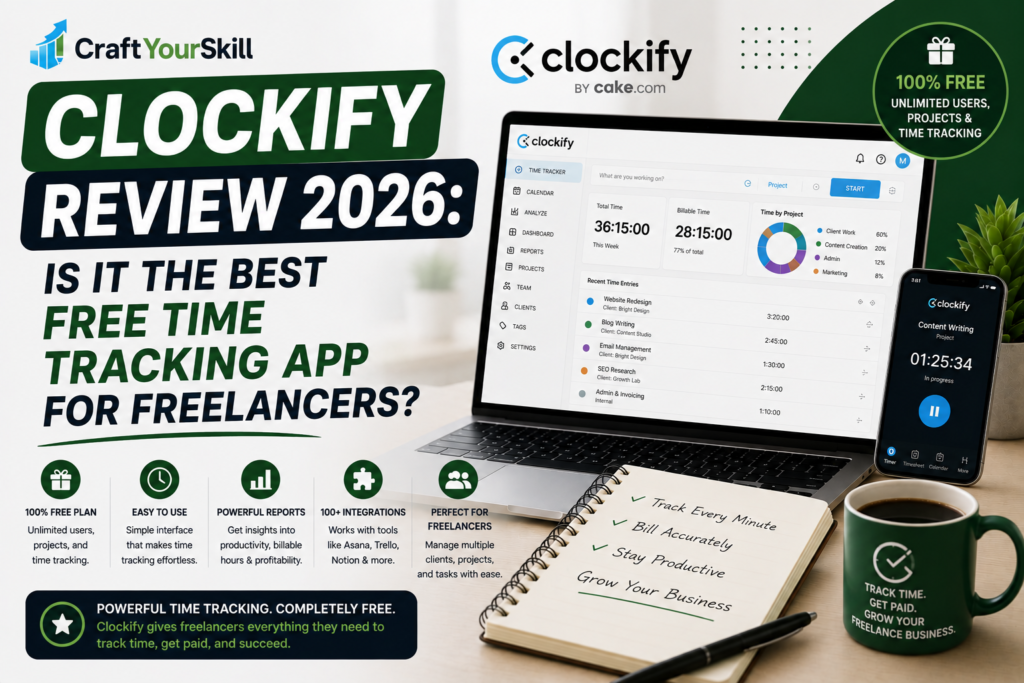
Unlike many competitors, Clockify offers one of the most generous free plans available. It allows unlimited users, unlimited projects, and unlimited time tracking without requiring a paid subscription. For freelancers and small businesses, this makes it one of the most attractive options on the market.
But does free mean you’re compromising on quality?
After testing Clockify in a typical freelance workflow, the answer is largely no. While it lacks some of the polish and advanced reporting found in premium competitors like Toggl Track, it delivers an impressive feature set that easily covers the needs of most independent professionals.
What Is Clockify?
Clockify is a cloud-based time tracking platform designed to help individuals and teams record working hours, organize projects, generate reports, and improve productivity.
Unlike many competing solutions that target large enterprises, Clockify remains approachable for solo freelancers while still offering enough scalability for growing businesses.
Users can:
- Track billable hours
- Create projects and clients
- Generate timesheets
- Monitor project budgets
- Produce productivity reports
- Track attendance
- Collaborate with teams
Its biggest advantage is that many of these features are available without paying for a subscription.
Getting Started
Setting up Clockify is straightforward.
After creating an account, you can immediately begin adding clients, creating projects, and tracking your first task.
The dashboard presents everything clearly, including recent time entries, projects, reports, and timers.
Although there are more menu options than you’ll find in Toggl Track, navigation remains intuitive after a short learning period.
For freelancers moving from spreadsheets or manual tracking, Clockify feels like a significant upgrade without becoming overwhelming.
Key Features
Unlimited Time Tracking
Clockify’s most attractive feature is simple: unlimited time tracking on the free plan.
There are no restrictions on how many hours you log, how many projects you create, or how many clients you manage.
For freelancers handling multiple ongoing contracts, this flexibility is difficult to beat.
Project and Client Management
Clockify lets you organize work by client, project, and task.
For example, a freelance web designer could create separate projects for website design, maintenance, and SEO services under a single client account. This organization makes reporting and invoicing much easier later.
You can also assign billable hourly rates to projects, helping you calculate income more accurately.
Timesheets and Calendar View
In addition to the timer, Clockify allows manual time entry through a timesheet or calendar interface.
This is particularly useful if you forget to start the timer or need to reconstruct your workday after the fact.
The calendar view also makes it easy to spot gaps or overlapping entries.
Reporting
Clockify includes several useful reports, including:
- Summary reports
- Detailed reports
- Weekly reports
- Billable hours
- Project profitability
- Team activity
While the visual presentation isn’t quite as polished as some premium competitors, the information is comprehensive and easy to export.
Integrations
Clockify integrates with many tools freelancers already use, including:
- Trello
- Asana
- Jira
- ClickUp
- Notion
- Slack
- Google Calendar
- GitHub
- Zapier
These integrations help reduce context switching and make it easier to track time directly from your existing workflow.
Real-World Freelance Workflow
Imagine you’re a freelance virtual assistant supporting four clients.
You begin the day by tracking administrative work for Client A. After completing that task, you switch to email management for Client B and then spend the afternoon updating spreadsheets for Client C.
Each session is recorded separately under the appropriate client and project.
At the end of the month, Clockify provides a detailed breakdown of every billable hour, allowing you to prepare accurate invoices without relying on memory or handwritten notes.
This workflow is where Clockify shines. It removes much of the administrative burden from running a freelance business.
Pricing
Clockify offers one of the strongest free plans in the time tracking industry.
For many solo freelancers, the free version is more than enough to manage clients, projects, and billable hours.
Paid plans introduce additional capabilities such as:
- Time approvals
- Labor costs
- Expense tracking
- Advanced scheduling
- Team management
- Custom reporting
Most freelancers can comfortably start with the free version and upgrade only if their business grows.
What We Like
Clockify’s biggest strength is value.
Very few competitors offer unlimited tracking, unlimited projects, and comprehensive reporting without requiring payment.
The software also performs well across desktop, web, and mobile devices, making it easy to keep your time records synchronized.
For freelancers trying to minimize operating costs, it’s one of the easiest recommendations available.
Where Clockify Falls Short
Clockify isn’t perfect.
Compared to Toggl Track, the interface feels slightly busier and less refined. Some users may also find the reporting less visually appealing, particularly if they regularly present reports to clients.
Additionally, while the free plan is generous, certain advanced administrative features are reserved for paid subscriptions.
None of these drawbacks are major, but they’re worth considering if user experience is your highest priority.
Clockify vs Toggl Track
Clockify and Toggl Track dominate the freelance time tracking market for good reason.
Clockify stands out by offering one of the most generous free plans available, making it ideal for freelancers who want professional time tracking without recurring software costs.
Toggl Track, on the other hand, offers a cleaner interface, stronger reporting, and a more refined overall user experience.
If your primary concern is budget, Clockify is difficult to beat.
If ease of use and polished reporting matter more, Toggl Track remains our top recommendation.
We’ll explore these differences in much greater detail in our upcoming Toggl Track vs Clockify comparison.
Who Should Use Clockify?
Clockify is an excellent choice for:
- New freelancers
- Consultants
- Virtual assistants
- Designers
- Writers
- Small agencies
- Anyone looking for powerful free time tracking software
It’s particularly valuable for professionals who want to manage multiple clients without adding another monthly subscription.
Conclusion
Clockify has earned its reputation as one of the best free time tracking tools available. It combines generous features, reliable performance, and flexible project management into a platform that meets the needs of most freelancers without requiring a paid subscription.
While competitors like Toggl Track offer a more polished experience, Clockify’s value is difficult to overlook. For freelancers who want accurate time tracking, detailed reports, and unlimited projects without increasing monthly expenses, it’s one of the strongest options available in 2026.