Running a freelance business means wearing many hats. You’re not only responsible for delivering work to clients—you also need to manage projects, organize notes, track invoices, plan content, and stay on top of deadlines.
Many freelancers start with a collection of different apps. One for notes, another for task management, another for project planning, and yet another for document storage. While this setup works initially, it often becomes difficult to manage as your workload grows.
That’s one reason Notion has become one of the most popular productivity tools among freelancers, creators, and small businesses. Instead of juggling multiple applications, it offers a flexible workspace where you can organize nearly every aspect of your business.
But flexibility isn’t always a benefit. New users sometimes find Notion overwhelming because it doesn’t force you into a predefined system.
So, is Notion still worth using in 2026?
After testing it for project management, content planning, client work, and personal organization, the answer is yes but only if you’re willing to spend a little time building a system that fits your workflow.
What Is Notion?
Notion is an all-in-one productivity platform designed to combine notes, documents, databases, task management, calendars, and project planning into a single workspace.
Instead of switching between several applications, you can build your own organized system inside Notion.
Many freelancers use it as the central hub for running their business.
For example, a freelance writer could manage article ideas, editorial calendars, client briefs, invoices, proposal templates, and research notes—all within one workspace.
Key Features
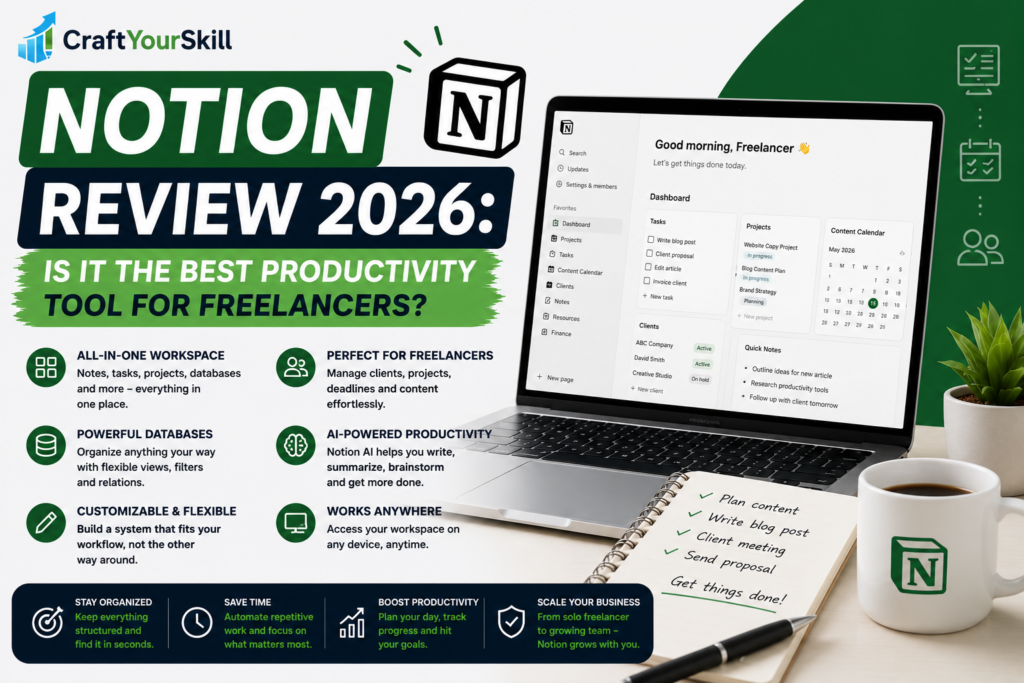
One of Notion’s biggest strengths is that it adapts to different workflows rather than forcing everyone into the same structure.
Custom Dashboards
Dashboards are often the first thing freelancers create.
Instead of opening five different applications every morning, you can design one homepage that displays:
- Today’s priorities
- Active client projects
- Upcoming deadlines
- Notes
- Recent documents
- Content calendar
Having everything visible in one place saves time and reduces mental clutter.
Databases
Databases are what separate Notion from traditional note-taking apps.
You can create databases to organize:
- Clients
- Projects
- Blog articles
- Freelance proposals
- Job applications
- Affiliate content
- Expenses
Unlike spreadsheets, databases can be filtered, sorted, grouped, and connected to one another, making them surprisingly powerful.
Notes and Documentation
At its core, Notion is still an excellent writing tool.
Creating meeting notes, client documentation, SOPs (Standard Operating Procedures), or content briefs feels intuitive.
Everything is searchable, making it easy to find information months later.
Templates
One reason beginners can get started quickly is the enormous library of templates.
You don’t need to build everything from scratch.
There are templates for:
- Content calendars
- CRM systems
- Budget trackers
- Reading lists
- Habit trackers
- Freelance client management
- Business planning
These templates can save hours of setup time and offer ideas for organizing your work more effectively.
AI Features
Notion AI has become much more capable over the past year.
It can help you:
- Summarize meeting notes
- Rewrite paragraphs
- Brainstorm article ideas
- Create outlines
- Translate text
- Generate action items from documents
For freelancers, these features are most useful when working with large amounts of information. Rather than replacing your writing, Notion AI helps speed up organization and drafting.
Ease of Use
The first time you open Notion, it can feel surprisingly empty.
Unlike many productivity apps that guide you through a fixed workflow, Notion simply gives you a blank page.
For some people, that’s empowering.
For others, it’s overwhelming.
Fortunately, once you start using templates and understand the basics of pages, blocks, and databases, everything begins to make sense.
Most users become comfortable after a few days of regular use.
Pricing
Notion offers a generous free plan that includes enough features for many freelancers.
The paid plans mainly add:
- Increased collaboration features
- Larger file uploads
- Advanced permissions
- More powerful AI capabilities
- Business-focused functionality
For solo freelancers, the free plan is often sufficient until their business grows.
What We Like
The biggest advantage of Notion is flexibility.
Whether you’re managing two clients or twenty, your workspace can evolve with your business.
Everything—from content planning to invoice tracking—can live in one organized system.
This reduces the need to constantly switch between applications and helps create more consistent workflows.
Another strength is how well Notion scales.
The same workspace that works for a freelancer can later support a growing agency or team without requiring a complete migration to another platform.
Where Notion Falls Short
Notion isn’t perfect.
If your only goal is tracking a simple to-do list, it may feel unnecessarily complex.
Similarly, businesses managing highly detailed project timelines with multiple team members may prefer software built specifically for project management.
Performance can also slow slightly when working with extremely large databases, although this is rarely an issue for individual freelancers.
Best Alternatives
Although Notion is one of the most versatile productivity tools available, it isn’t the only option.
Popular alternatives include:
- Trello
- ClickUp
- Asana
- Monday.com
- Evernote
- Obsidian
Each tool has its strengths depending on your preferred workflow.
Is Notion Worth It in 2026?
For freelancers, the answer is almost certainly yes.
The ability to centralize client information, project planning, notes, and business operations inside a single workspace makes Notion one of the best productivity investments available today.
While it requires some initial setup, the long-term time savings easily justify the effort.
If you enjoy building personalized systems and want one place to manage your freelance business, Notion remains one of the strongest options in 2026.
Conclusion
Notion continues to stand out because it doesn’t try to solve just one productivity problem. Instead, it gives freelancers the tools to build a workspace that matches the way they work.
Whether you’re planning content, managing clients, organizing research, or tracking projects, Notion can replace several separate applications and bring everything together in one place.
If you’re willing to invest a little time setting up your workspace, it’s one of the best productivity tools available for freelancers in 2026.